HARP - Human Agent Revenue Platform
Redesigning the workday of a revenue team, from twenty tabs to one decision surface.
Role
Lead AI Product Designer & GTM Systems Architect
Tools → One Surface
20+
Manual Steps (Baseline)
~180
Target: Fully Autonomous
~60%
GTM Personas Mapped
5
The Short Version
Sales reps at a large enterprise were spending their days serving their software instead of their customers. Twenty-plus tools. Endless swivel-chair data entry. Fifteen to twenty minutes of research just to find one valid contact.
I led the design of an Agentic Operating System: a single orchestrated cockpit where AI agents do the preparing and humans do the deciding. The work spanned three service design maps and day-in-the-life studies across five GTM personas, from XDR to RevOps. The design bet was simple to say and hard to build. Stop measuring screen time. Start measuring selling time.
The Problem: A Stack That Sells Nothing
When I started mapping the end-to-end revenue journey through user interviews and three service design maps, the picture that emerged was not a workflow. It was an obstacle course. In the words of the field, the experience was crappy, disjointed, appalling, fatiguing, obtuse, and overlapping. Their words, not mine.
Mapping the terrain first. Before diagnosing friction, I needed a shared map of where work actually happens. I decomposed the GTM motion into five L1 phases and roughly forty L2 stages, then tagged each stage with the number of distinct pain points surfaced in research. The heat clustered immediately: sequencing and outreach carried twelve pain points, quote creation carried twelve more, and solution alignment six. That map became the backbone for every service blueprint, persona study, and design decision that followed.
That linear map was step one. The real GTM motion is not a line, it is a loop: pre-sales and post-sales mirror each other and hand off at quote-to-order, then the relationship curves back around through renewal into a new prospecting cycle. I rebuilt the process as an infinity loop and layered in exactly where an agent or skill could sit at each of the twelve stages, from prospecting and account research through renewal.
The Tab Apocalypse. The average rep was not working in a system. They were trapped in a digital maze: tens of business applications, hundreds of dashboards, and 10 to 20 browser tabs open at any given moment. The tool carousel spanned CRM, sales engagement, prospecting databases, call intelligence, content management, enterprise search, BI dashboards, CPQ, e-signature, and chat, plus a shadow layer of consumer AI tools reps had bolted on themselves.
The numbers made the fatigue quantifiable:
| Friction Metric | Baseline |
|---|---|
| Manual steps from prospect to closed-won | ~180 |
| Tool switches per workflow, per single account | 8 to 12 |
| Pre-call research time per account | 15 to 20 minutes |
| Double or triple data entry per workflow | 2 to 3 instances |
| Browser tabs open on a typical day | 10 to 20 |
Phase 1: Prospecting, and the cottage industry at the edge. The book scrub had reps cross-referencing three systems for 15 to 20 minutes per account, often against stale CRM data. One rep put it perfectly: the account record listed six CEOs from the last two decades, and they had no idea who to contact. In one book of 1,500 manufacturing accounts, only 17 contacts were opted in for automated outreach, effectively breaking sequencing tools entirely.
So reps routed around the enterprise. High-value target lists lived in personal spreadsheets. The technically inclined built their own AI assistants and prompt libraries in consumer tools to draft emails and pull data. This cottage industry of DIY agents was my single most important research signal: the demand for an intelligent orchestration layer already existed. The enterprise had simply failed to supply it.
Phase 2: Opportunity management punished efficiency. Content search was described as atrocious; even when reps knew a document existed, native search could not find it, forcing a second search tool as an expensive intermediary. Call intelligence synced one way only, so detailed MEDDPICC notes had to be manually re-entered into the CRM to update forecasts. A rigid $10K to $12K contract threshold blocked access to Solution Consultants, leaving AEs to build technical templates they were never trained to build. And a fast “soft approval” in chat still had to be duplicated as a formal CRM case for the audit trail. The system literally punished reps for being efficient.
Phase 3: Quote-to-order was a babysitting job. A known CPQ bug meant adding a support line item erroneously flagged clean deals for DealDesk exception review; reps learned to delete and re-add line items just to dodge their own tooling. Catching a minor typo on an approved quote reverted the entire thing to draft, restarting an hours-long approval chain from scratch. Contract generation had devolved into laggy submenu spelunking. Countersignature bots missed their SLAs so often that reps actively babysat signed deals, manually pinging operations to finish the job.
Then came the cliff. Handing customer context to the onboarding team was such an administrative burden that AEs almost never did it. Onboarding consultants either started from zero with an already-frustrated customer or spent hours excavating old call recordings to reconstruct what was promised during the sale.
The real finding. The deeper finding was psychological, not operational. These were passionate, relationship-first professionals being buried under poorly integrated software. A fatigued sales force cannot deliver a premium customer experience. The stack was not just an efficiency leak. It was a morale killer.
A Day in the Life: Five Personas, One Shared Exhaustion
Service maps show the system. Personas show the people inside it. I reconstructed a typical day for each of the five primary GTM roles from the interview data, and a pattern emerged that no metric could capture: nobody's day was sequential. Every persona lived in a loop of context-switching, workarounds, and babysitting.
The Account Executive opens the day against a book of 15,000 to 20,000 accounts, spending 15 to 20 minutes per account hunting for a valid contact. By late morning the opt-out wall has killed automated sequencing, so they are copy-pasting notes into personal AI tools to hand-draft emails one at a time. Meeting prep means another research sprint and a search tool that cannot find documents they know exist. The afternoon is spent deleting and re-adding a line item to dodge a CPQ bug, then clicking through laggy submenus to generate an order form. The day ends with the double-entry tax: retyping MEDDPICC notes from the call recorder into the CRM because the sync only flows one way.
The XDR / MDR starts by triaging lead volume in a personal spreadsheet that mirrors the account tiers their AEs set, because no prioritization tool exists. Hours go into manual contact research that ends in bounced emails and reception-desk phone numbers. Booking a single meeting means manually writing out availability across time zones. And the day's cruelest moment comes at 4:00 PM: after sourcing a real expansion deal, system rules force them to open a new opportunity for credit, an AE folds it into an existing renewal instead, and the XDR's opportunity gets abandoned. That not only costs commission, it feeds false closed-lost data back into the very routing algorithms meant to help them.
Cognitive psychology gives this a name: context-switching and window-reorientation fatigue. Poorly designed, fragmented environments force people to do more work than necessary just to understand or master a process, and the cost is attention that never reaches the customer. Thousands of non-revenue hours and millions in tooling overhead were being spent just getting through the day.
The AE Manager tries to inspect pipeline health and hits a blindspot: reps treat stage updates as a chore, so deals sit in “Discover” indefinitely. A quick discount sign-off in chat still has to be re-documented in the CRM for the audit trail. By end of period, reps honestly do not have time to update opportunities, so the manager abandons the CRM altogether, collects commit numbers in a disconnected spreadsheet, and spends hours aggregating it by hand.
The Customer Success Account Manager mines the book for renewals through a manual loop of health, hypothesis, alignment, engagement, forecast. Midday is spent negotiating rules of engagement with AEs over who owns an expansion, and manually sharing notes so the customer sees one motion instead of two. They have no visibility into which provisioning emails went to which contact, so when an activation lands in the billing contact's inbox instead of the technical admin's, they file a support case and then babysit it, because support routinely misroutes it or replies with an FAQ link. At 3:30 PM they inherit the handoff cliff: a new customer, no notes from the sale, and hours of old call recordings to mine for what was promised.
Sales Ops and RevOps begin with a backlog of DealDesk exception requests, half of which are false alarms from the same CPQ bug. They reject contracts where one system shows a 5 percent discount and another shows zero. They revert fully approved quotes to draft over a single typo, knowing it restarts an hours-long approval chain for the rep. And they spend the afternoon watching a countersignature bot that regularly misses its SLA, stepping in to sign and upload contracts manually.
Five roles, five schedules, one diagnosis. Every persona had become an unpaid integration layer between systems that refused to talk to each other. That insight reframed the design brief: the OS would not be built around a screen. It would be built around each persona's day, and the goal was to hand back the hours.
The Reframe: From Sidebar to Operating System
I distilled the research into a three-panel brief for leadership. The problem: teams navigate dozens of applications and dashboards that are inaccurate and inconsistent with each other. Moreover: nothing in the stack recommends an insight or a next best action, so every decision starts from zero. The solution panel was left deliberately blank. That question mark was the whole point of the workshop.
Most AI-in-sales products are passive sidebars. A chatbot in the corner, waiting for a prompt, answering through a keyhole.
I argued for the opposite posture, and the research demanded it. The design opportunity was never to add tab number twenty-one. It was to eradicate the isolated silos entirely and replace them with a single intelligent orchestration layer. The system should not wait for a command. It should anticipate the workflow, do the administrative cognitive labor in the background, and greet the human with a paved path to the next best action.
The vision statement we aligned on was deliberately specific about qualities, not features: unified, persona-led, intelligent, modular, scalable, and seamless.
We codified this into a target task distribution that became our north star, paired with a provocation: if the current process takes 180 steps, can the future one take fewer than 100?
| Engagement Model | Target | What It Means |
|---|---|---|
| Fully autonomous | ~60% | Background orchestration: data hygiene, research, enrichment |
| Agent-prepared, human-decided | ~25% | The “draft economy” of approvals, edits, and dismissals |
| Human-led | ~10% | High-stakes relationships and strategy |
| Human-augmented | ~5% | Real-time agent assistance during live calls |
The core directive fit on a sticky note: the agent prepares, the human decides.
Design Principles as Guardrails
To prevent throwaway engineering cycles, I wrote ten non-negotiable rules and split them into two layers. Principles are the overarching beliefs about control, trust, customer value, and experience quality. Tenets are the specific, measurable ways we design, build, and evaluate under those principles. Every one of them is phrased as a question someone can actually answer, not a platitude to nod along to.
The five principles:
- Agent executes, human governs. The system does the work; the rep makes the call. Can the rep explain why they took the action?
- Earn trust through transparency. AI must prove itself on every interaction. Would they bet their commission on this recommendation?
- Protect the customer relationship. The rep's reputation is sacred. Would they be comfortable if the customer saw how this was made?
- Consistency is kindness. Patterns learned once should work everywhere. Can a new team member predict unseen screens from seen ones?
- One system, not twenty tools. The platform replaces tool-switching, not adds to it. How many browser tabs are open? Target is one.
The five tenets:
- Show the next best action, not everything. Reduce decisions, don't add them. Can they take the highest-impact action in three minutes?
- Context travels with the user. Never make the rep re-orient. Can they resume mid-workflow after an interruption?
- Fail gracefully, never silently. When things go wrong, be loud and helpful. If everything broke, would they know what still works?
- Speed over completeness. Partial and fast beats complete and slow. Can they process ten approvals in under two minutes?
- Measure selling time, not screen time. The product succeeds when reps spend less time in it. Did customer-facing hours increase after adoption?
We also drew a hard boundary I call the anti-strategy: this is not a database. Giving every rep raw access to a data lake would only shift the cognitive load, not remove it. The system had to be prescriptive. It delivers the “why now,” not just the “what.”
The Interaction Model: Push, Pull, and the Draft Economy
Every agentic motion in the system fits one of three tiers:
- Autonomous runs by itself. High-volume, low-complexity work like attribution cleanup happens invisibly, with logs available on demand.
- Assist is a pull experience. The rep asks for help: “Draft a personalized outreach email for this account.”
- Augment is a push experience. The system finds the rep: “This deal is at risk. Multi-threading is missing.”
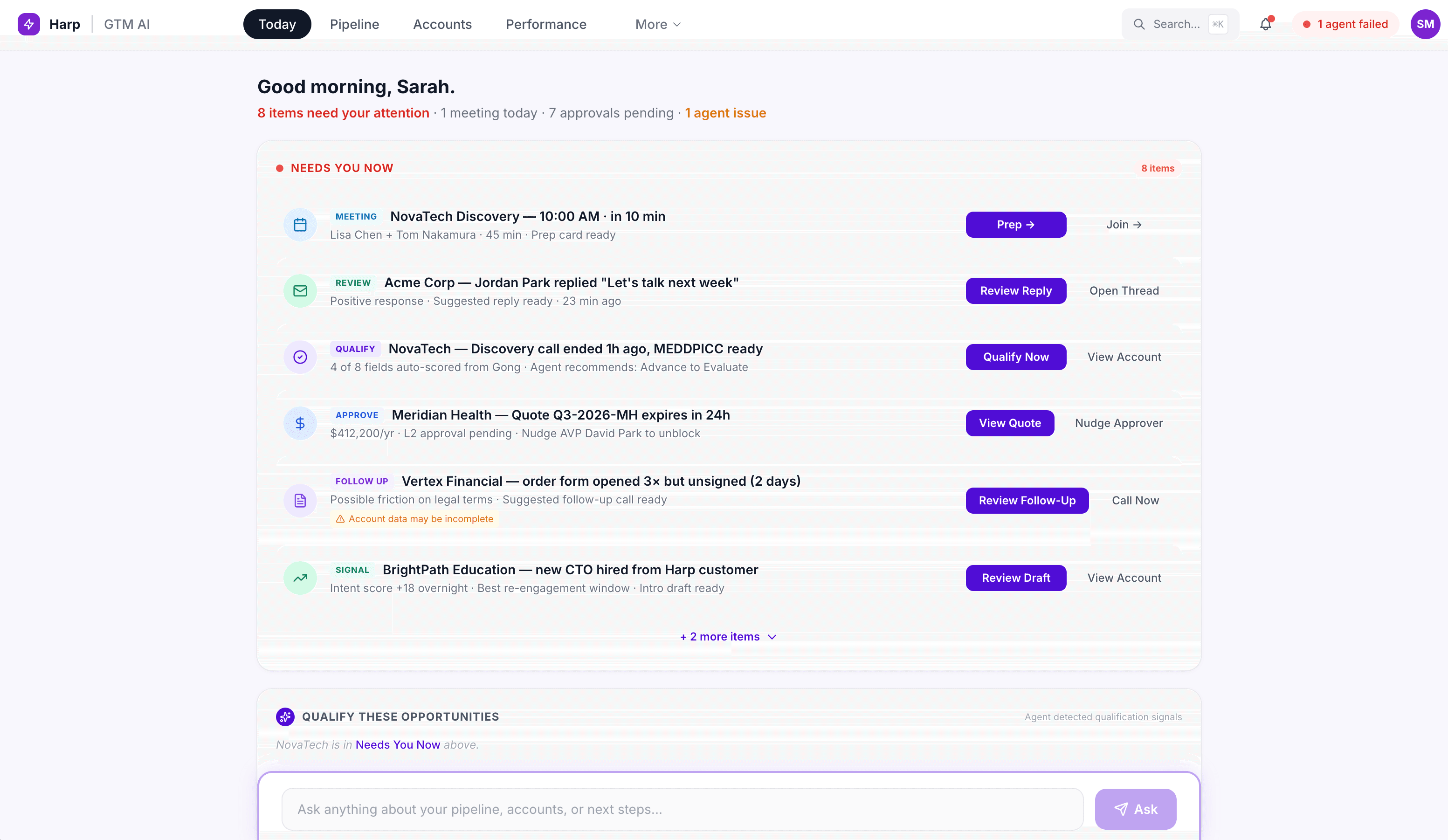
The “Needs Your Attention” Dashboard. The front door of the OS is not a chat log. Text transcripts create high cognitive load and hide context behind a keyhole. Instead, the dashboard is a fluid, info-visual cockpit built for pattern recognition.
Agent-prepared drafts, pipeline alerts, and coaching signals arrive as visual cards. An hour of administrative work compresses into a run of approve, edit, or dismiss decisions. Reps can nibble the elephant: ten micro-approvals in under two minutes.
Every recommendation is drillable and explainable. A confidence score is not a decoration; it is a doorway. Click it and you see the exact call transcript snippet or news event that triggered the agent's reasoning. Trust is earned one receipt at a time.
Live Call Orchestration. During live meetings the OS listens alongside the rep. It populates the MEDDPICC qualification scorecard in real time from the conversation itself and surfaces suggested questions to dig deeper into pain points. When the call ends, there is no second shift of copying notes from the call recorder into the CRM. The double entry is simply gone.
Before and After: From Human Middleware to Governing User
In traditional enterprise software the user is the middleware. They copy, paste, re-key, and carry context between applications that refuse to talk. The Agentic OS inverts that relationship, from active user and passive software to active software and a governing user. This mapping became the centerpiece of the design story, tracing every current-state pain point to the pattern that resolves it.
The simplest way to show the shift was a single AE's day, 9 AM to 5 PM. Today that day is sliced into seven blocks with twenty-six tools strewn underneath it. In the future state, the same blocks collapse under one GTM AI Experience layer, and the block for customer meetings and demos roughly triples in width. That widening bar is the entire thesis in one picture.
| GTM Stage | The Tab Apocalypse (Before) | The Agentic OS Pattern (After) | Design Outcome |
|---|---|---|---|
| Outbound Prospecting | Manual triage across CRM, social, and enrichment tools plus personal spreadsheets: 15 to 20 minutes per account. Opt-out rates break sequencing. Reps build a cottage industry of DIY AI prompts. | Bookscrub 2.0. A unified prospecting console on a shared intelligence layer. Agents surface verified, opted-in contacts, run tech-stack and competitive research, and draft hyper-contextual outreach. Drafts land in the cockpit for approve, edit, or skip. | Research and drafting compressed from 20 minutes to under 2 per account. The cottage industry consolidated into one secure, visual environment. |
| Opportunity Management | Atrocious content search routed through a second tool. No SC support under a $10K to $12K threshold. One-way call-to-CRM sync forces MEDDPICC double entry. | Real-Time Call Copilot and Pipeline Brief. Agents transcribe live, surface the right use case as it becomes relevant, and pre-score MEDDPICC. One click writes scored insights back to CRM fields with a next-best-action recommendation. | Context travels with the user. Self-serve AI bridges the SC gap for smaller deals. Two-way writes end double entry. |
| Quote-to-Order and Post-Sales | CPQ bug triggers false exception approvals. A typo on an approved quote reverts it to draft. Laggy three-dot submenus. Handoff notes almost never reach onboarding. | Unified Deal Room and CPQ Hub. Flat visual workspace for quoting, exceptions, and redlines. Self-healing quotes validate discrepancies and absorb minor edits without breaking approval state. Context auto-packages to onboarding on close. | Errors handled proactively so velocity holds. The handoff cliff disappears, reducing first-renewal churn risk. |
Outbound Prospecting
Before
Manual triage across CRM, social, and enrichment tools plus personal spreadsheets: 15 to 20 minutes per account. Opt-out rates break sequencing. Reps build a cottage industry of DIY AI prompts.
After
Bookscrub 2.0. A unified prospecting console on a shared intelligence layer. Agents surface verified, opted-in contacts, run tech-stack and competitive research, and draft hyper-contextual outreach. Drafts land in the cockpit for approve, edit, or skip.
Design Outcome
Research and drafting compressed from 20 minutes to under 2 per account. The cottage industry consolidated into one secure, visual environment.
Opportunity Management
Before
Atrocious content search routed through a second tool. No SC support under a $10K to $12K threshold. One-way call-to-CRM sync forces MEDDPICC double entry.
After
Real-Time Call Copilot and Pipeline Brief. Agents transcribe live, surface the right use case as it becomes relevant, and pre-score MEDDPICC. One click writes scored insights back to CRM fields with a next-best-action recommendation.
Design Outcome
Context travels with the user. Self-serve AI bridges the SC gap for smaller deals. Two-way writes end double entry.
Quote-to-Order and Post-Sales
Before
CPQ bug triggers false exception approvals. A typo on an approved quote reverts it to draft. Laggy three-dot submenus. Handoff notes almost never reach onboarding.
After
Unified Deal Room and CPQ Hub. Flat visual workspace for quoting, exceptions, and redlines. Self-healing quotes validate discrepancies and absorb minor edits without breaking approval state. Context auto-packages to onboarding on close.
Design Outcome
Errors handled proactively so velocity holds. The handoff cliff disappears, reducing first-renewal churn risk.
Interaction Architecture: Three Stages, Three Design Fixes
1. Prospecting: retiring the spreadsheet. SMB reps were flying blind against 15,000 to 20,000 accounts, re-prioritizing their book roughly once a year because the volume made anything more frequent impossible.
The fix is the Bookscrub 2.0 workspace. A background agent continuously reads intent signals, active conversations, and tech-stack changes, then serves a curated daily Top X queue directly in the cockpit. No hunting. Inside each account, the rep sees pre-verified, opted-in stakeholders on a single canvas. One click on “Draft Outreach” triggers a localized agent that writes from historical account trends. A fifteen-minute chore becomes a three-second micro-approval.
2. Opportunity management: escaping the chatbot keyhole. Standalone chat assistants force the user to hold the entire process in working memory and steer it line by line. That is the keyhole effect, and it is the wrong shape for a live sales call.
The fix is a fluid, info-visual call copilot. The live-transcribing agent does not print text; it populates a visual MEDDPICC scorecard as the conversation unfolds. When the customer names a technical pain point, the system highlights that pain block and slides the matching pre-approved use case onto the side of the screen, in the moment, without a search box in sight.
3. Quote-to-order: eradicating the red tape. The fix is one visual deal room where quote creation, exception approvals, and legal redlining live together. Workflows self-heal: when two systems disagree on a discount, the OS flags it and offers a one-click “Synchronize Quotes” repair instead of a rejected contract. And on close, the system auto-extracts buyer personas, technical roadblocks, and purchased use cases into a Post-Sales Briefing for the CSAM. The handoff that reps almost never did now happens without anyone doing it.
Cognitive outcomes. The architecture is modular, a set of Lego blocks rather than a monolith, but the outcomes are system-wide. Reps spend zero effort on window reorientation, login timeouts, or raw data parsing. Administrative capacity is reallocated to customer-facing relationships. And beneath every recommendation sits plain-English “Why Now” reasoning with a confidence level, so the system explains itself before anyone has to ask.
Shipping It: Back-Casting from the North Star
Rather than shipping band-aids, we back-cast from the vision so every MVP was a load-bearing building block.
Pilot A: Pipeline Brief. Qualification and risk updates move into an approve, edit, dismiss flow, deep-linked back into the CRM so the record stays the source of truth.
Pilot B: Bookscrub 2.0. The manual spreadsheet ritual is replaced with signal-based prioritization and a daily Top X nudge, turning a 20-minute research chore into a 20-second decision.
Along the way, design played an unusual role: strategic coordinator. The biggest risk in agentic systems is not bad AI. It is siloed workstreams shipping horizontal features that never add up to one coherent motion. My job was to make prospecting, opportunity management, and quote-to-order feel like a single experience, and to get every team to stack hands on the tenets before a line of code was written.
What I Learned
Agentic UX is a trust problem wearing an automation costume. The hardest design work was not the agent's capability. It was the explainability surface that lets a rep bet their commission on a recommendation.
Chat is a keyhole. Conversational interfaces are a fallback, not a destination. For high-volume operational work, visual pattern recognition beats reading every time.
Prescription beats access. Users do not want more data. They want fewer, better decisions, with the reasoning one click away.
Take care of the employee experience and the customer experience follows. The most valuable thing this system automates is not a task. It is fatigue.
HARP transforms the job to be done from a life of administrative research into a life of pure action. It shields the representative from the friction of the stack so they can focus on the one thing that cannot be automated: the human relationship.